Did you know you can watch Prenot@mi for newly opened appointments all day long, completely free? You can, and this article shows you how. You will see how the GrabMyTurn monitor works, what it does when it finds an appointment, and why it beats the traditional paid tools.
The monitor works while you live your life
Cancellation appointments show up at unpredictable times and disappear within minutes. Nobody can stare at a screen all day. The monitor does it for you: you pick the service, turn the monitor on, and it checks the portal on its own. When an appointment opens, the app alerts you right away.
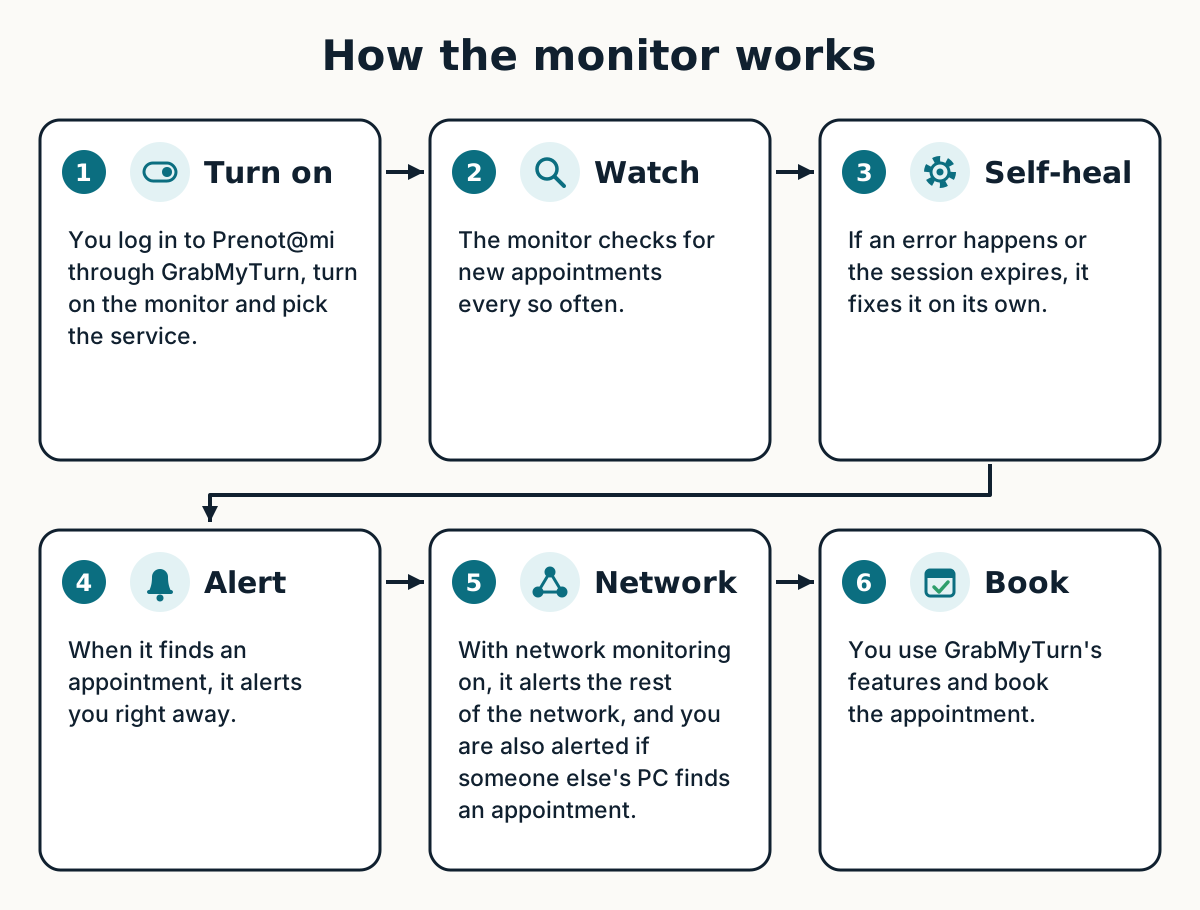
It is free and runs on your own computer, with your own account.
The advantage of the collaborative monitor
You can turn on the collaborative monitor in your app and get notified when another PC finds an appointment before you do.
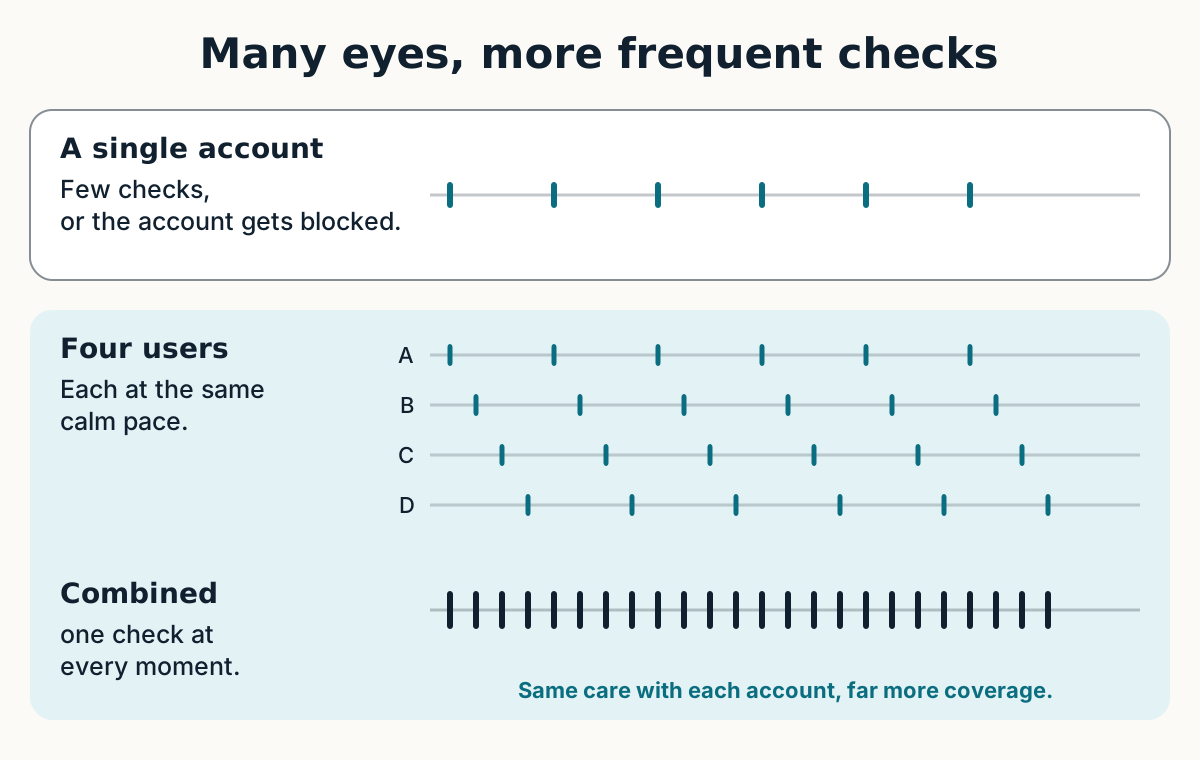
Why not just keep clicking the service, as fast as you can, all day? Because the portal does not forgive that pace. In our experience, hitting refresh every few seconds leads to the dreaded Account Bloccato (the portal’s “blocked account” message), and your account would probably get blocked. A single account cannot safely win that game at the frequency you would need.
The way out is to split the work.
In GrabMyTurn, the watching is shared. People who pick the same consulate and service join the same queue, and each person checks at a calm pace, on their own computer. Because everyone checks at a different moment, the portal is checked far more often in total than any single account could manage, without overloading any account.
Think of the security guards of one building: each one stays on their own floor. When one of them sees something, they tell the others by radio. The radio does not watch anything, it only carries the message. That is how it works: the watching belongs to each user and the cloud only relays the alert. That is why we also call it the cloud monitor.
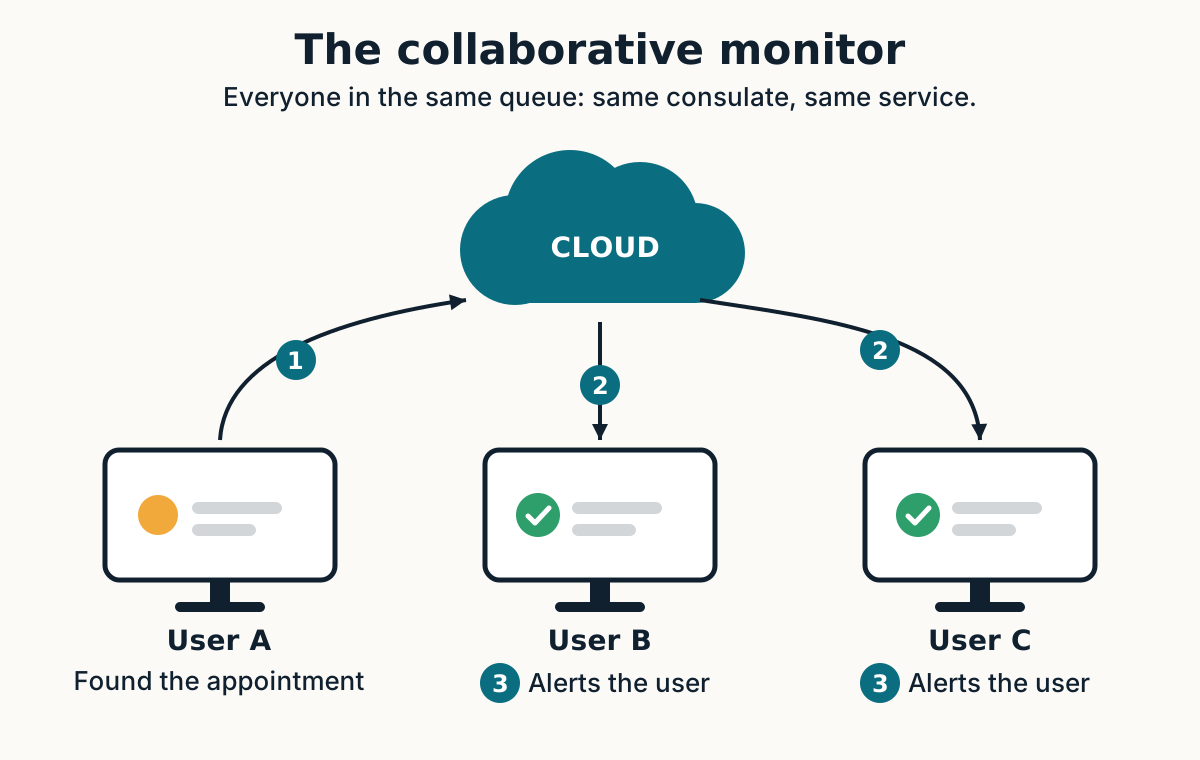
When someone in the queue finds an appointment, the cloud alerts the others, and their apps double-check before notifying: you only get the alert if the form opens for you too. One alert per appointment, and far fewer false alarms.
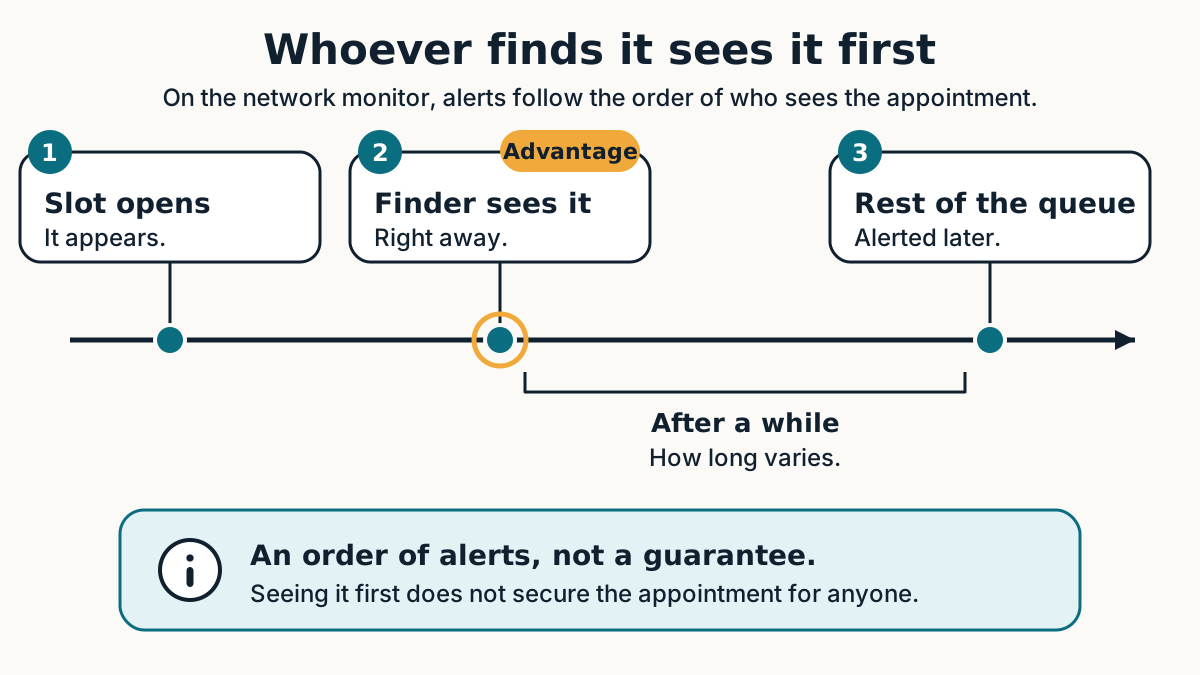
Whoever finds it first gets ahead
The person who detects the appointment sees it right away and gets a few moments of advantage before the rest of the queue is notified. It is the network’s fair way of rewarding whoever contributes checks: whoever collaborates, gains.
Why use the GrabMyTurn network monitor
- More checks: the work is split among everyone, so the combined frequency is much higher than a single account’s.
- More coverage: each queue is watched by the people who picked it, so every service has someone keeping an eye on it.
- More reliable alerts: the app checks again on your computer before alerting you.
- Free: the monitor is just one more GrabMyTurn feature and is available on the Free plan.
- Transparency: everyone can see all the appointments that were found. No fake notifications.
Your data and your account
The monitor runs on your computer, with your login, and stops at the first sign of a block. Collaborative mode sends only anonymous data: time, service code, consulate and whether the form opened. Never your email, password, cookies or form data, and no identifier of you or your computer. The details are on the privacy.
GrabMyTurn is independent software, with no affiliation with Prenot@mi, the Italian government or any consulate.
Summary
- The monitor watches Prenot@mi for you, for free, and alerts you when an appointment opens.
- In collaborative mode, the checking is split among the users of the same queue, so the combined frequency is much higher.
- You are also alerted when another PC in the network finds an appointment.
- Whoever finds it first gets ahead, and whoever collaborates gains.
Frequently asked questions
Is the Prenot@mi appointment monitor really free?
Yes. The monitor is just one more GrabMyTurn feature and is available on the Free plan.
Does the monitor book the appointment for me?
No. It alerts you as soon as an appointment opens, and the decision is yours. That is by design: booking involves steps only you can do, such as the CAPTCHA and the OTP.
Do I need to leave my computer on and the app open?
Yes, the monitor runs on your computer. You can minimize the app, but closing it stops the monitor.
What happens when the session drops?
The app logs back in on its own with the login you saved. If it cannot, or if something looks odd, it stops and alerts you.
What if a CAPTCHA appears?
The monitor pauses, hands the screen over so you can solve it, and alerts you. It does not try to solve or get around the challenge.
What is the “cloud monitor”?
It is another name for the collaborative monitor. The watching stays on each person’s computer, and the cloud only relays the alert when someone in the queue finds an appointment.
Why split the checking among users?
Because checking too fast with a single account can get it blocked. Split among many people, each account checks calmly and the portal is watched far more often.
Is it safe for my account?
The app checks at a calm pace and stops at the first sign of a block. Never hand your password to anyone else, including anyone who promises to book or resell appointments.
What data is sent? What about privacy?
Only anonymous data: time, service code, consulate and whether the form opened. Never your email, password, cookies, form data or OTP.
Does it work for every consulate and service?
It works with the services the app recognizes on Prenot@mi, one at a time.
Does the monitor guarantee an appointment?
No. Appointments are scarce and can vanish fast, but with the monitor you do not depend on watching the screen yourself.